This notebook demonstrates how to manage short-term and long-term agent memory using LangGraph and Redis. We'll explore:
- Short-term memory management using LangGraph's checkpointer
- Long-term memory storage and retrieval using RedisVL
- Managing long-term memory manually vs. exposing tool access (AKA function-calling)
- Managing conversation history size with summarization
- Memory consolidation
What we'll build
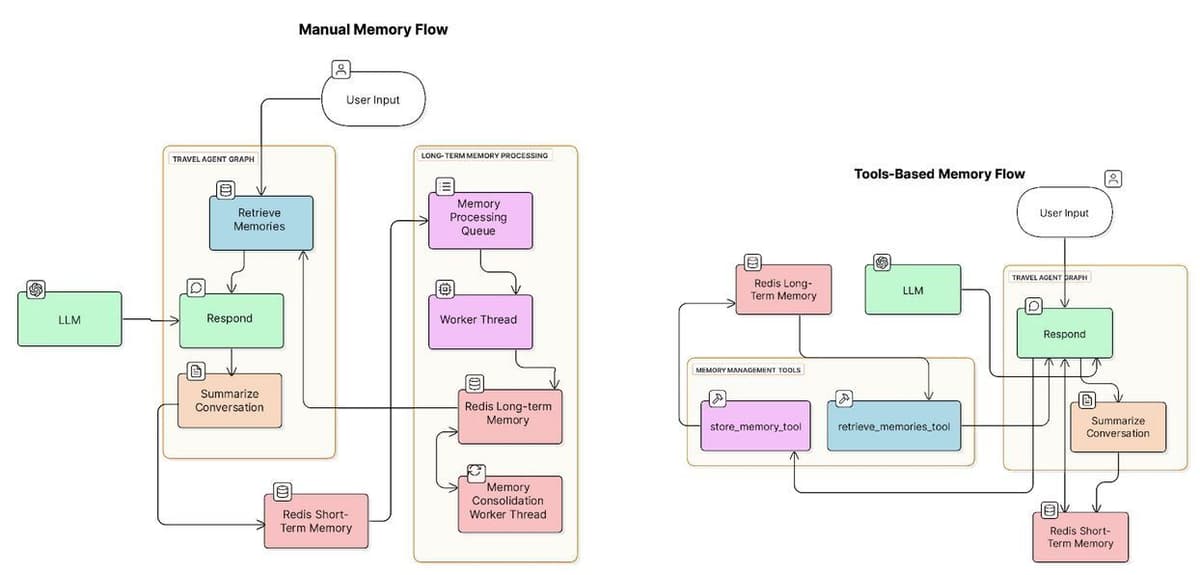
We're going to build two versions of a travel agent, one that manages long-term memory manually and one that does so using tools the LLM calls.
Here are two diagrams showing the components used in both agents:
Setup
Required API keys
You must add an OpenAI API key with billing information for this lesson. You will also need a Tavily API key. Tavily API keys come with free credits at the time of this writing.
Run Redis
For Colab
Convert the following cell to Python to run it in Colab.
For alternative environments
There are many ways to get the necessary redis-stack instance running
- On cloud, deploy a FREE instance of Redis in the cloud. Or, if you have your own version of Redis Software running, that works too!
- Per OS, see the docs
With docker: docker run -d --name redis-stack-server -p 6379:6379 redis/redis-stack-server:latest
Test connection to Redis
Short-term vs. long-term memory
The agent uses short-term memory and long-term memory. The implementations of short-term and long-term memory differ, as does how the agent uses them. Let's dig into the details. We'll return to code soon.
Short-term memory
For short-term memory, the agent keeps track of conversation history with Redis. Because this is a LangGraph agent, we use the RedisSaver class to achieve this. RedisSaver is what LangGraph refers to as a checkpointer. You can read more about checkpointers in the LangGraph documentation. In short, they store state for each node in the graph, which for this agent includes conversation history.
Here's a diagram showing how the agent uses Redis for short-term memory. Each node in the graph (Retrieve Users, Respond, Summarize Conversation) persists its "state" to Redis. The state object contains the agent's message conversation history for the current thread.
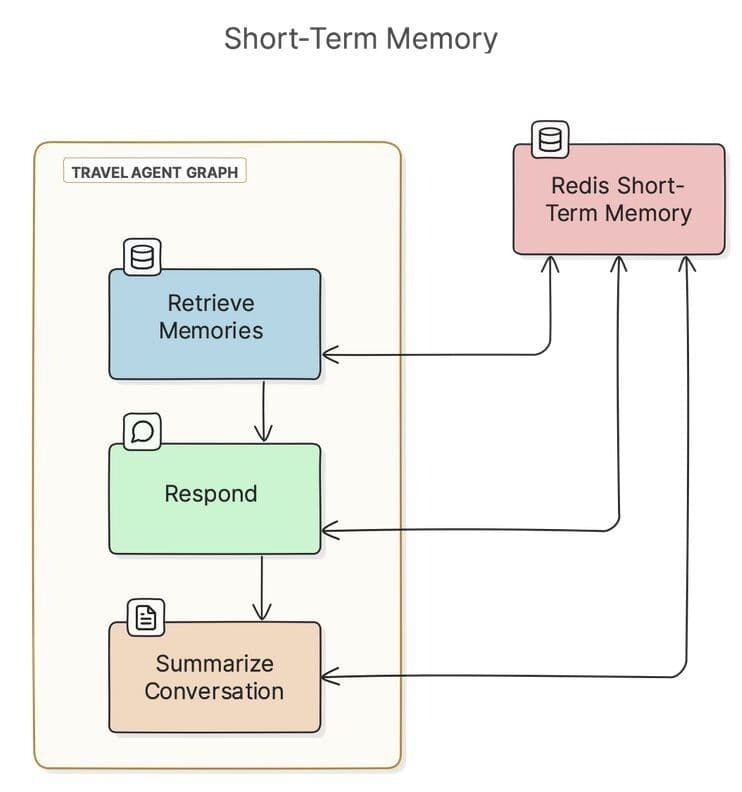
If Redis persistence is on, then Redis will persist short-term memory to disk. This means if you quit the agent and return with the same thread ID and user ID, you'll resume the same conversation.
Conversation histories can grow long and pollute an LLM's context window. To manage this, after every "turn" of a conversation, the agent summarizes messages when the conversation grows past a configurable threshold. Checkpointers do not do this by default, so we've created a node in the graph for summarization.
NOTE: We'll see example code for the summarization node later in this notebook.
Long-term memory
Aside from conversation history, the agent stores long-term memories in a search index in Redis, using RedisVL. Here's a diagram showing the components involved:
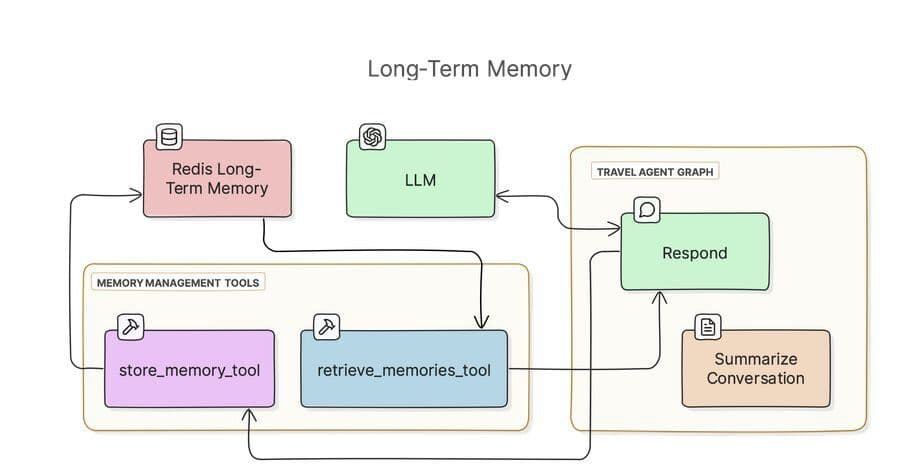
The agent tracks two types of long-term memories:
- Episodic: User-specific experiences and preferences
- Semantic: General knowledge about travel destinations and requirements
NOTE If you're familiar with the CoALA paper, the terms "episodic" and "semantic" here map to the same concepts in the paper. CoALA discusses a third type of memory, procedural. In our example, we consider logic encoded in Python in the agent codebase to be its procedural memory.
Representing long-term memory in python
We use a couple of Pydantic models to represent long-term memories, both before and after they're stored in Redis:
We'll return to these models soon to see them in action.
Short-term memory storage and retrieval
The RedisSaver class handles the basics of short-term memory storage for us, so we don't need to do anything here.
Long-term memory storage and retrieval
We use RedisVL to store and retrieve long-term memories with vector embeddings. This allows for semantic search of past experiences and knowledge.
Let's set up a new search index to store and query memories:
Storage and retrieval functions
Now that we have a search index in Redis, we can write functions to store and retrieve memories. We can use RedisVL to write these.
First, we'll write a utility function to check if a memory similar to a given memory already exists in the index. Later, we can use this to avoid storing duplicate memories.
Checking for similar memories
Storing and retrieving long-term memories
We'll use the similar_memory_exists() function when we store memories:
And now that we're storing memories, we can retrieve them:
Managing long-term memory manually vs. calling tools
While making LLM queries, agents can store and retrieve relevant long-term memories in one of two ways (and more, but these are the two we'll discuss):
- Expose memory retrieval and storage as "tools" that the LLM can decide to call contextually.
- Manually augment prompts with relevant memories, and manually extract and store relevant memories.
These approaches both have tradeoffs.
Tool-calling leaves the decision to store a memory or find relevant memories up to the LLM. This can add latency to requests. It will generally result in fewer calls to Redis but will also sometimes miss out on retrieving potentially relevant context and/or extracting relevant memories from a conversation.
Manual memory management will result in more calls to Redis but will produce fewer round-trip LLM requests, reducing latency. Manually extracting memories will generally extract more memories than tool calls, which will store more data in Redis and should result in more context added to LLM requests. More context means more contextual awareness but also higher token spend.
You can test both approaches with this agent by changing the memory_strategy variable.
Managing memory manually
With the manual memory management strategy, we're going to extract memories after every interaction between the user and the agent. We're then going to retrieve those memories during future interactions before we send the query.
Extracting memories
We'll call this extract_memories function manually after each interaction:
We'll use this function in a background thread. We'll start the thread in manual memory mode but not in tool mode, and we'll run it as a worker that pulls message histories from a Queue to process:
Augmenting queries with relevant memories
For every user interaction with the agent, we'll query for relevant memories and add them to the LLM prompt with retrieve_relevant_memories().
NOTE: We only run this node in the "manual" memory management strategy. If using "tools," the LLM will decide when to retrieve memories.
This is the first function we've seen that represents a node in the LangGraph graph we'll build. As a node representation, this function receives a state object containing the runtime state of the graph, which is where conversation history resides. Its config parameter contains data like the user and thread IDs.
This will be the starting node in the graph we'll assemble later. When a user invokes the graph with a message, the first thing we'll do (when using the "manual" memory strategy) is augment that message with potentially related memories.
Defining tools
Now that we have our storage functions defined, we can create tools. We'll need these to set up our agent in a moment. These tools will only be used when the agent is operating in "tools" memory management mode.
Creating the agent
Because we're using different LLM objects configured for different purposes and a prebuilt ReAct agent, we need a node that invokes the agent and returns the response. But before we can invoke the agent, we need to set it up. This will involve defining the tools the agent will need.
Responding to the user
Now we can write our node that invokes the agent and responds to the user:
Summarizing conversation history
We've been focusing on long-term memory, but let's bounce back to short-term memory for a moment. With RedisSaver, LangGraph will manage our message history automatically. Still, the message history will continue to grow indefinitely, until it overwhelms the LLM's token context window.
To solve this problem, we'll add a node to the graph that summarizes the conversation if it's grown past a threshold.
Assembling the graph
It's time to assemble our graph.
Consolidating memories in a background thread
We're almost ready to create the main loop that runs our graph. First, though, let's create a worker that consolidates similar memories on a regular schedule, using semantic search. We'll run the worker in a background thread later, in the main loop.
The main loop
Now we can put everything together and run the main loop.
Running this cell should ask for your OpenAI and Tavily keys, then a username and thread ID. You'll enter a loop in which you can enter queries and see responses from the agent printed below the following cell.
That's a wrap. Let’s start building
Want to make your own agent? Try the LangGraph Quickstart. Then add our Redis checkpointer to give your agent fast, persistent memory.
Using Redis to manage memory for your AI Agent lets you build a flexible and scalable system that can store and retrieve memories fast. Check out the resources below to start building with Redis today, or connect with our team to chat about AI Agents.
- Redis AI resources: GitHub repo with code samples and notebooks to help you build AI apps.
- Redis AI docs : Quickstarts and tutorials to get you up and running fast.
Redis Cloud: The easiest way to deploy Redis—try it free on AWS, Azure, or GCP.